AI Journaling: How to Beat the Blank Page Without Losing Your Own Voice
Not because you don't care. You care enormously — that's why you opened it in the first place. But the sentence won't start. Where do you even begin? With the job? The coffee? The quiet after the laugh? The page sits there, patient and empty, and the moment that felt so vivid an hour ago starts to thin out like fog. After a minute you close the app. Nothing gets written. Again.
So you open the journal. Paper one, or the app on your phone. The cursor blinks. You put your thumb on the screen. And nothing comes.
It's the end of a day that mattered. Maybe it was your first morning at a new job, the one where you walked in not knowing where the coffee was and left feeling, somehow, like you belonged. Maybe your kid said something at dinner so funny and so true that you laughed out loud and then went quiet, because you knew you'd forget the exact words by morning.
If that's you, I want to say something plainly before we go any further: most journals don't die from a lack of caring. They die at the blank page. Starting is the barrier — not motivation, not discipline, not whether you're "a journaling person." And this is exactly where AI journaling has quietly become useful, as long as you use the right kind. Because there's a version of AI that helps you start and shape what you want to say, and there's a version that writes the whole thing for you. Only one of those is worth your time. A journal that sounds like someone else isn't worth rereading.
This is an honest walkthrough of how to use AI to get past the blank page without losing the one thing that makes a journal yours: your own voice.

Why the Blank Page Kills Journaling (and Where AI Actually Helps)
Let's diagnose the real problem, because once you see it clearly, you stop blaming yourself for the wrong thing.
The barrier is almost never the writing itself. It's the first sentence. Think about it: once you've got a sentence down — any sentence, even a clumsy one — the second one comes easier, and the third easier still. Writing has momentum. The hard part is the standing start, the moment when you have to manufacture something from nothing while a small voice in your head whispers that whatever you write won't be good enough. People who abandon their journals are rarely the people who didn't care. They're usually the ones who cared the most, who wanted the entry to be worthy of the moment, and froze under the weight of that.
The barrier is starting, not caring.
Here's the mechanism underneath it. The blank page is a decision problem. Before you can write a word, your brain has to answer an impossible question: what do I even write about? An empty page offers no starting point, no handhold, no shape to push against. So your brain does a quick cost-benefit calculation, finds the cost too high and the reward too vague, and returns nothing. You read that "nothing" as proof you're bad at this. You're not. You just asked your tired, end-of-day brain to invent structure and content and emotional honesty all at once, with zero scaffolding. Of course it balked.
This is also why the most common journaling advice fails so reliably. "Just write every day." "Build the habit." "Be consistent." None of that removes the friction — it adds pressure on top of it. Now you're not only facing the blank page, you're facing the blank page plus the guilt of a broken streak. Generic motivation treats the symptom (you're not writing) instead of the cause (you can't start). It's like telling someone who's afraid of cold water to "just swim more." Technically true. Completely unhelpful.
Where a good tool genuinely lowers the bar
This is the narrow, honest case for AI. A thoughtful journaling AI doesn't write your life for you — it hands you the handhold the blank page refuses to offer. It supplies a starting point. A prompt. A suggested title. A loose structure to grow into. In other words, it reduces the activation energy of the first sentence, which is the exact place where journaling dies. Lower the cost of starting, and suddenly the whole calculation flips: the entry feels possible, so you do it.
If you've ever used a good human-written prompt, you already know this works — the right question does half the job of starting for you. Our own exists for exactly this reason: thirty ready-made openings so you never have to face the empty page cold. An AI prompt is simply the on-demand, personalized version of the same idea. Both are antidotes to the same problem. The modern ai diary, then, isn't a robot ghostwriter — it's a well-timed nudge that answers "what do I even write about?" so your brain has somewhere to go.
September journal prompts post
A quick word of honesty about the why beneath all this, because this is where a lot of apps overpromise and I'd rather not. Reflective writing is associated with improvements in how people report feeling — the that keeping a journal can help you manage stress and work through emotions. Note the careful words there: associated with, can help. It is not a treatment. It is not a guaranteed outcome, and anyone who tells you journaling will fix your life is selling you something. What's reasonable to say is gentler and truer: writing things down often helps people feel a little clearer, and clearing the blank-page barrier simply makes it more likely you'll actually get the benefit of the habit at all.
University of Rochester Medical Center notes
So the reframe is this: "I'm just not a journaling person" is almost always "I kept getting stuck at the start."But here's the catch, and it's the hinge the whole rest of this piece turns on: not every kind of AI help is the kind you want.
That's not a character flaw. It's a friction problem — and friction problems have solutions.
AI Should Assist, Not Author: The Line That Matters
Let me draw the line as clearly as I can, because this is the single most important decision you'll make about how you journal with AI.
There are, broadly, two kinds of tool wearing the same label. The first is an AI journal generator — you give it a topic, maybe a mood, and it writes a complete, polished entry for you. It reads beautifully. It is also, in the way that counts, hollow. Because it's not your day, your observation, or your heart on the page — it's a plausible-sounding imitation of what someone's day might have been like. The second is an AI journal assistant — it prompts you, suggests a title, offers structure, and expands the real fragments you give it, so the finished entry is still unmistakably yours. One replaces you. The other gets out of your way. The difference looks small on the surface and is enormous on the reread.
And the reread is everything. Here's a test I'd ask you to apply to any journaling tool before you trust it with your memories. Imagine opening this entry in ten years. When you're older, or sadder, or just nostalgic on a rainy afternoon, you'll go looking for the version of yourself who wrote it. If the entry sounds like you — your turns of phrase, your private jokes, the way you always notice the weather first — it'll land like a letter from a friend you'd forgotten you had. If it sounds like a competent stranger who happened to know the facts of your day, you'll feel nothing. You'll scroll past it. The entire value of a journal is realized on the reread, which means the writing has to sound like you, or the whole project quietly fails years down the line when it was supposed to pay off.
A journal that sounds like someone else isn't worth rereading.
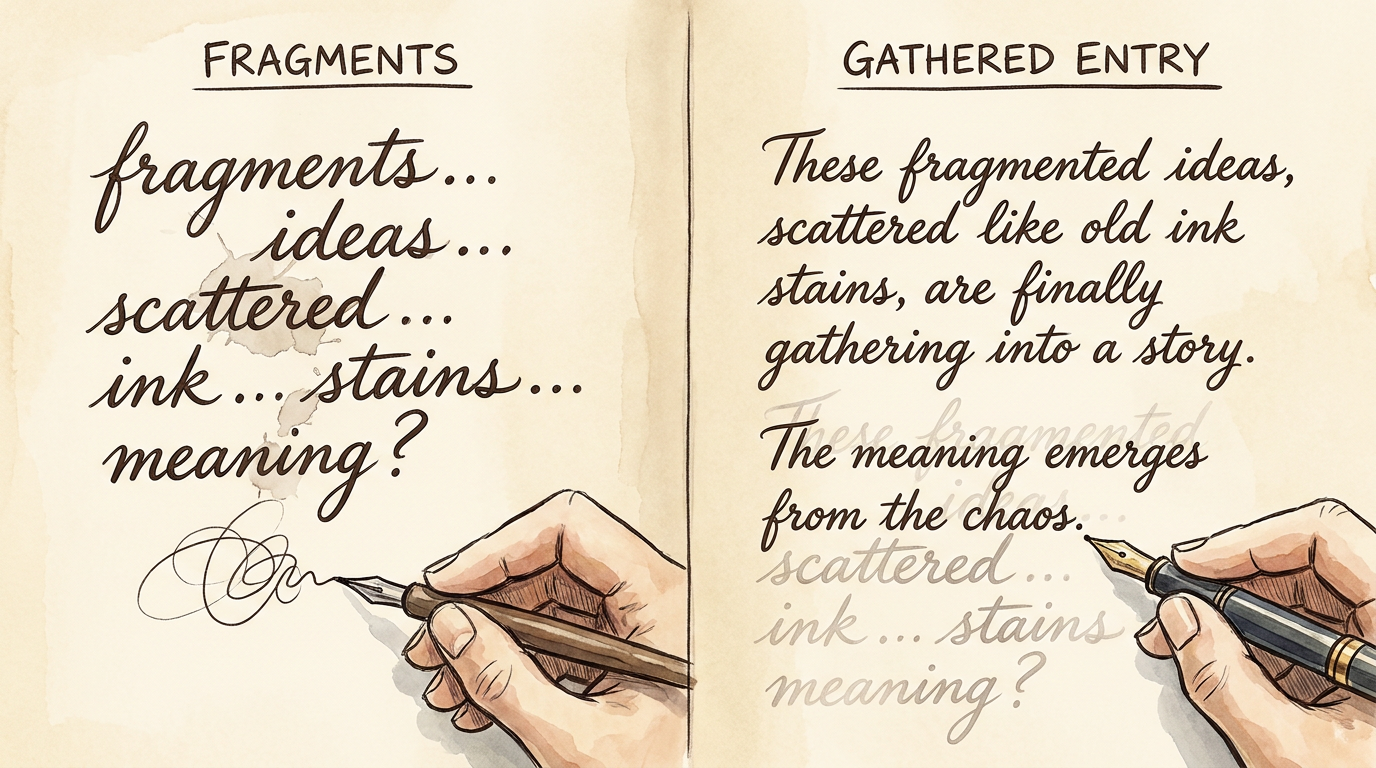
What "expand your fragments" actually means
I want to be concrete, because "AI helps you write" is exactly the kind of vague promise that leads people astray. Here's the honest version of how a good assistant works. You give it a few real words — "rained all day, she laughed at the dog, I felt lighter than I have in weeks" — or you speak a quick voice note while you're brushing your teeth. The assistant takes that raw material and shapes it into something readable: it adds connective tissue, suggests a shape, maybe a title. Then — and this is the part that protects everything — you edit it back into your own voice. You cut the phrases you'd never actually say. You put the real ones back in. The AI builds the scaffolding; you keep the authorship. That last clause is the whole ballgame.
This is also where I want to address the fear directly, because a lot of thoughtful people hesitate here and they're right to. Does using AI make the memory less real? Less mine? The honest answer: no — as long as the voice and the facts stay yours. You lived the day. You chose the words that matter. The assistant just helped you type faster and start sooner. That's not so different from a friend asking "what happened today?" and you finding your story in the telling.
But there's a genuine failure mode, and I won't pretend otherwise: it's when you let the AI invent. If you accept a sentence describing a feeling you didn't actually have, or a detail that didn't actually happen, because it "sounds nice," you've stopped journaling and started writing fiction about yourself. That's the trap of the generator model. The feelings have to be real. The facts have to be true. The AI's job is to help you express what was already there — never to supply what wasn't.
This principle isn't a nice-to-have for us. It's the foundation Lugelo's is built on — in the company's own words, the assistant "gently prompts, expands, and enriches your writing — without replacing your voice." That last phrase is the entire point, and it's the reason we draw the line between assist and authorSo with the principle settled, let's get practical. Here's a method you can actually follow — tonight.
AI Journaling feature
so hard. We'd rather help you write ten honest sentences than hand you a flawless paragraph that isn't you.
How to Use AI to Journal Without Losing Your Voice, in 5 Steps
This is the part you came for: a repeatable, low-pressure routine. Each step is small on purpose. The goal is not a perfect entry — it's an entry that exists and sounds like you.
- Start with a few honest words (or a voice note). Don't aim for a paragraph. Don't aim for good. Just give the raw material — the truest two or three fragments from your day. "Rained all day. She laughed at the dog. Felt lighter than I have in weeks." That's enough. If typing feels like one task too many at the end of a long day, speak it instead — a voice note absolutely counts, and sometimes we're more honest out loud than we are on a screen. The entire point of this step is to beat the blank page by refusing to treat it as blank. You already have the words. You just said them.
- Let the assistant suggest a prompt or a title. This is the step that removes the decision that stalls you. You hand over your fragments; the assistant offers a title or a question to grow the entry around. A title is quietly powerful — it gives the entry a shape, a direction to lean into, so you're no longer building from nothing. Lugelo's assistant does exactly this: enter a simple idea and it suggests meaningful titles to help you begin, as described on the Lugelo FAQ page. And if you'd rather start from a human-written prompt than an AI one, that's completely valid too — a curated set like our September journal prompts does the same job. Both paths are good. Pick whichever gets you moving.
- Expand a fragment, then edit it to sound like you. Let the assistant turn your shorthand into a readable draft — a few sentences of connective tissue around your raw words. Then do the one thing that protects your whole journal: change it back. Read the draft out loud. Cut any phrase you'd never actually say. Swap in your own words — the slang, the understatement, the way you always undersell the good days. This editing pass takes ninety seconds and it's the single most important step in this entire list. Don't skip it. It's the difference between a diary that's yours and a diary that's generic.
- Add photos, video, or voice to the Moment. Make the entry multimodal so it carries more than text. The photo of the rain on the window. The ten-second clip of the laugh. A voice note of you, tired and happy, narrating the day. Lugelo calls a single entry a "Moment," and a Moment can hold photos, video, audio, and text all at once. Text alone preserves what you thought; adding media preserves what it actually felt like to be there. Years later, the sound of that laugh will do something no sentence can.
- Let it land on your Memory Lane timeline. Once saved, the entry takes its place in a chronological record you can scroll and reread — what Lugelo calls your Memory Lane. This is where the quiet magic is. One entry feels small. But on a timeline, entry after entry, week after week, they start to form a story. The value of journaling compounds over months and years, and a timeline is simply the interface that lets you feel that compounding instead of losing it in a folder you never open.
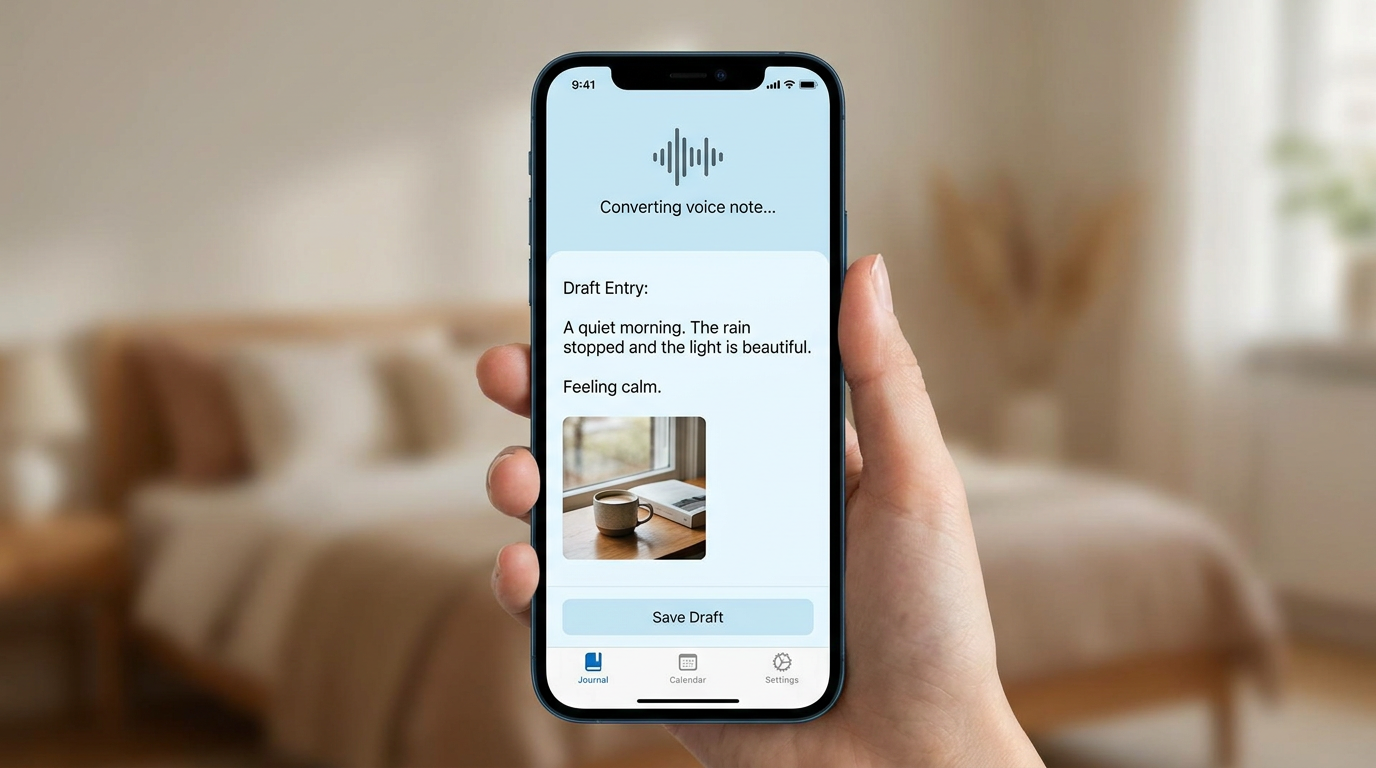
Notice the shape of this method: the AI reduces friction at the start (steps 1–2) and at the end (shaping and saving, steps 3 and 5). The meaningNow that the method is clear, let's widen out to the small, specific jobs a good assistant quietly handles day to day.
— what the day was, how it felt, what it mattered — is supplied entirely by you, every single time. That's the balance that makes it work. You never outsource the part that's actually you.
Ways the AI Journal Assistant Actually Helps
The five-step method is the ritual. But in practice, an ai journal assistant earns its place by solving a handful of small, recurring friction points — the exact moments where people usually give up. Here's what it's genuinely good for, honestly, with the limits named each time.
Beating the blank page
This is the headline use, and it's the best one. When you've got nothing — no energy, no opening line, no idea where to start — the assistant supplies the first move. Not the whole entry. The move. The suggested title, the opening question, the handhold. It turns "I can't start" into "oh, I can start there," which is all you ever needed. The limit: it opens the door; you still have to walk through it with your own words.
Turning shorthand into a readable entry
Most of us capture life in fragments — a two-second note tapped out at a red light, three words before sleep. On their own, those fragments are too thin to reread with any pleasure. The assistant expands them into something coherent and worth revisiting, still in your words once you've done your editing pass. The limit: it's expanding what you gave it, not inventing what you didn't. Keep your fragments honest and the entry stays honest.
Captioning photos
If you're anything like most people, your camera roll is a graveyard of context-free images — thousands of files, no story. A good assistant can suggest captions for those photos so a pile of pixels becomes a record with meaning attached. Lugelo's support exactly this kind of work — captioning, speech-to-text, even scan-to-text to turn old documents into entries. The limit: the caption is a draft of what you remember; you're the one who knows which Tuesday this really was.
Photo Journal and AI features
Suggesting reflective prompts
Left to our own devices, we tend to journal about the same three things. A good assistant can nudge you toward a question you wouldn't have reached for — "what surprised you this week?", "who were you kind to today?" — opening doors in your own memory you'd have walked right past. The limit: a prompt is an invitation, not an obligation. Ignore the ones that don't fit.
Shaping scattered notes
Sometimes you've got half a dozen disconnected lines — a thought from the morning, a snippet from a call, a fragment from the drive home — and no sense of how they fit. The assistant can pull that scatter into a single coherent entry so the day reads as a day rather than a shopping list. The limit: you decide what belongs and what to leave out. Editing is judgment, and judgment is yours.
Across every one of these, the pattern holds: the assistant handles the mechanical friction — starting, expanding, captioning, organizing — and you keep the meaning. As Lugelo likes to put it, your memories deserve better than scattered apps. But "better" never means "automated away." It means the boring parts get easier so the meaningful parts actually get done.
Which brings us to the two questions any thoughtful reader is right to ask next: what can't this do, and what happens to my data?
The Honest Limits — and How Your AI and Privacy Work
Let me take the uncomfortable questions head-on, because a journaling tool that won't name its own limits hasn't earned your trust with your most personal writing.
First, the limits. AI does not know what your day meant. It cannot. It has your fragments and a very good sense of how sentences usually go, but it has no idea that the reason the dog thing mattered is because it was the first time she'd laughed since the move. It can suggest words; it cannot supply feeling. And the moment you let it invent feeling or detail to fill a gap, the entry quietly stops being true — which means it stops being worth keeping. So the rule is simple and non-negotiable: don't outsource the meaning. Edit everything it gives you. Treat its drafts as scaffolding, not scripture. The scaffolding helps you build; it isn't the building.
Keep the bar where it belongs, too. The goal was never a perfect, literary entry. The goal is an entry that sounds like you and that you'll actually reread in five years. A slightly rough paragraph in your real voice beats a flawless one in nobody's voice, every single time. If you remember one thing from this whole piece, make it that.
Second, privacy — in plain English, because this is your diary. Your journals are private by default. Sharing is owner-controlled: you decide who can view or contribute, and access can be revoked whenever you want. Your data is encrypted in transit, your personal data is not sold to third parties, and deletion is available if you ever want to walk away cleanly. That's the whole posture, stated without hedging or jargon. What I won't claim — because it would be dishonest — is that any digital tool guarantees your words will exist forever, or that journaling is a clinical treatment. It isn't either of those things, and you should be wary of anyone who says otherwise.
You don't have to take my word for any of this. The full, plain-English detail on how the AI and the privacy model work lives on the Once the entry exists and you know it's safe, something genuinely lovely becomes possible — the thing you were too stuck to write can grow into something you'll want to keep forever.
Lugelo FAQ page
, so you can verify it rather than trust it on faith — which is exactly how it should be. And practically speaking, it's available where you already live: web, iOS, Android, and HarmonyOS, so your journal travels with you across devices.
From AI-Assisted Entry to Keepsake You'll Actually Keep
Here's the payoff, and it's bigger than "I wrote something today."
Remember that a Moment can hold text, photos, video, and voice all at once. That multimodal richness compounds. A written line tells you what you thought; a photo shows you the light that evening; a ten-second clip gives you the actual sound of the laugh. Stack those together across an entry, and across hundreds of entries on your timeline, and you've built something no single format could ever hold — a record that doesn't just describe your life but lets you step back into it.

And those entries don't have to stay as entries. This is where the "I was too stuck to write" story turns all the way around. The small, AI-assisted Moments you almost didn't write can become:
- An eBook or PDF — your journal, exported as a book you can hold, gift, or quietly keep on a shelf.
- A scrapbook or storybook — your Moments arranged into a designed, flip-through keepsake rather than a scroll of entries.
- A VR Gallery you can step into — Lugelo turns your journal's images into an explorable 3D space, so instead of scrolling photos on a flat screen you walk through a gallery of your own memories. It's hard to overstate how different that feels; you can see for yourself on the Lugelo VR Galleries page.
- Shared journals — invite family or friends to contribute their own perspective of the same moment, so a memory has more than one narrator.
That last one matters more than it looks. Journaling is usually framed as a solo act, but some of the best moments belong to a group — the trip, the wedding, the slow Sunday with the grandparents. When you invite others to add their side of the same day, the record stops being one person's memory and becomes a shared one, richer for having more than one pair of eyes on it. That's the heart of what Lugelo means by create together.
Here's the compounding argument stated plainly. Any single AI-assisted entry feels small — a few honest words, a photo, a title. On its own, forgettable. But laid out on a timeline and gathered into a keepsake, those small entries become a story — one worth handing to someone you love. As Lugelo likes to say, journals are souvenirs of your past. The point was never the writing for its own sake. The point was having written — so that later, there's something to return to, to share, to step inside.
Preserve the moment first. The eBook, the gallery, the shared book — those are what the moment can becomeBefore we close, let's answer the practical questions readers still tend to have.
, once you've gotten past the blank page and actually captured it. Which was the whole problem we started with.
AI Journaling FAQ
What is AI journaling?
AI journaling means using an AI assistant to help you start, title, and shape your entries — supplying prompts and expanding your own words — while the writing and the meaning stay yours. It's a tool for getting past the blank page, not a ghostwriter for your life. The good versions reduce friction; they don't replace you.
Is an AI journal generator the same as an AI journal assistant?
No, and the difference matters. An AI journal generator writes a complete entry for you from a topic — polished, but hollow, because it isn't really your day. An AI journal assistant prompts, titles, and expands the real fragments you provide, so the finished entry stays in your voice. Choose the assistant.
Will AI make my journal sound fake?
Only if you let it. Fakeness creeps in when you accept phrasing you'd never use or details that didn't happen. The fix is a thirty-second editing pass: read the draft, cut anything that isn't you, and put your own words back in. Do that, and the voice stays unmistakably yours.
Can AI help if I have writer's block or freeze at the blank page?
Yes — this is its single best use. The blank page kills journaling because it offers no starting point, and a good assistant supplies exactly that: a title, a prompt, a first move to build around. It turns "I can't begin" into "I can begin there," which is usually all you needed.
Is my data private when I use AI features?
Your journals are private by default, sharing is owner-controlled (you decide who can view or contribute, and access can be revoked), your data is encrypted in transit, your personal data is not sold to third parties, and deletion is available. You can read the full, plain-English detail on the .
Lugelo FAQ page
Is AI journaling good for me or therapeutic?
Here's the honest version. Reflective writing is associated with improvements in how people report feeling — the notes it can help with managing stress and processing emotions. But it is not a clinical treatment and not a guaranteed outcome. Think "often helpful," not "cure."
University of Rochester Medical Center
What's the best journaling app for AI-assisted writing?
The best journaling app for this is the one that treats AI as an assistant, not an author — one that prompts and expands your words without replacing your voice, keeps your entries private by default, and lets you turn them into something lasting. That's the exact standard Lugelo was built to meet, which is why we'd point you there for AI-assisted journaling specifically.
What devices does it work on?
Web, iOS, Android, and HarmonyOS — so your journal syncs with you wherever you happen to be when a moment worth keeping shows up. For anything we didn't cover here, the full has the rest.
Lugelo FAQ

Conclusion
Picture that person again — the one from the start of this piece, sitting at the end of a day that mattered, staring at the blinking cursor while the moment slips away. Only this time it goes differently. They type three honest fragments. A suggested title gives the entry a shape to grow into. A quick edit cuts the words they'd never say and puts the real ones back. They add the photo of the rain and the ten-second clip of the laugh, and the Moment lands on their timeline. It took four minutes. And when they reread it, it sounds exactly like them.
That's the whole promise of AI journaling done right. AI is worth using when it helps you start and shape — and not for one second when it tries to write for you. The blank page is beatable. Your voice is the part worth protecting. Keep the bar low and the honesty high: one entry tonight, a few real words, is genuinely enough — and it's more than you'd have had otherwise.
Because the real goal was never the writing. It was having written — so that the ordinary Tuesday, the first day, the unrepeatable thing your kid said, don't quietly dissolve into fog. They stay. In your words.
Don't Just Live It — Keep It
Start a journal tonight — a few honest words is all it takes. Let Lugelo's AI Journal Assistant help you past the blank page while your voice stays yours.
Start Saving What Actually Matters →Available on web, iOS, Android, and HarmonyOS. Journals are private by default, and you decide who can view or contribute.
If you'd like to look before you leap, you can or .
see how memories become VR galleriesexplore everything Lugelo can do