
Shared Albums Always Die After the Trip. Here’s What Friend Groups Are Doing Instead
You know exactly how this goes. The group chat is electric for four days straight. Someone sends a photo of Danny asleep on the ferry and it gets nine replies in a minute. Then you all get home, and someone types the fateful words: “I’ll make an album.”So here’s the deal. If you came here to find out how to actually set one of these up, that’s the very next section — we’ll get you sorted in about two minutes flat, iPhone and Google Photos both, plus what to do when your group is split across platforms. No opinions, just the buttons.
This is not a personal failing. It happens to essentially every friend group on earth, and it happens for reasons that are pretty easy to explain once you look at them.
They do. Six people dump four hundred photos in it over the next seventy-two hours. Two people never add anything at all — they mean to, they genuinely do. And then, at some point in October, you realise nobody has opened it since August.
Then, once you’ve got your shared album working, we’ll talk about what happens to it six weeks later. Because there’s something friend groups have started doing instead of the photo grid, and it holds up a lot better.
How to Make a Shared Album on iPhone and Google Photos
Let’s get you what you came for. Below are the current, working steps for both major platforms, plus an honest read on what happens when your group is a mix of both. Everything here is checked against Apple’s and Google’s own published documentation, and the limits are quoted from the source rather than from memory.
How to create a shared photo album on iPhone (iCloud Shared Albums)
Apple’s Shared Albums feature has to be switched on before it appears anywhere in the Photos app. This trips up a surprising number of people who go hunting for a menu item that isn’t there yet.
Step 1 — Turn on Shared Albums.
Open Settings, tap [your name] at the top, then iCloud, then Photos. Switch on Shared Albums.
Step 2 — Create the album.
Open Photos. Tap Collections, then scroll to Shared Albums. Tap the Add button (+), then choose New Shared Album.
Step 3 — Name it and invite people.
Give the album a name — something the group will recognise in a notification, not “Album 3.” Tap Next, then add participants by choosing contacts or typing the email address or phone number tied to their Apple Account. Tap Create.
Step 4 — Add your photos and videos.
Open the album, tap Add, select what you want, and tap Done. Anyone you’ve invited can do the same from their own phone, which is the whole point.
Step 5 — Manage who’s in it.
Open the album, tap the More button (…), then open Album Details. From here you can invite more people, toggle whether subscribers are allowed to post their own photos, mute notifications, rename the album, or tap an individual’s name and choose Remove Subscriber.
Step 6 — Let non-Apple friends see it.
In Album Details, switch on Public Website. This generates a browser link you can send to anyone, and they’ll be able to view the album without an Apple Account. Apple’s documentation is specific about what this does: it enables viewing in a web browser. Contributing to an iCloud Shared Album is built around Apple Accounts. If your friend on Android wants to add their photos, this isn’t the route.
The full walkthrough lives on , and it’s worth a look if your iOS version presents a slightly different menu label — these interfaces move around between releases.
Apple’s Shared Albums guide
The limits Apple publishes — and the tradeoff behind them
This part matters more than people realise, and it’s genuinely useful to know before four hundred photos go in. All of these figures come straight from :
Apple’s published Shared Album limits
- 100 subscribers maximum per shared album.
- 5,000 combined photos and videos from all contributors in any single album.
- Videos up to fifteen minutes, delivered at up to 720p resolution.
- Photos reduced to 2,048 pixels on the long edge — with panoramas allowed up to 5,400 pixels wide.
- 200 shared albums an owner can share, and 200 a user can subscribe to.
- 200 comments per photo or video, at up to 1,024 characters each.
- 1,000 items per hour and 10,000 per day from a single contributor across all their shared albums.
Now, the important context, because the numbers on their own read like criticism and they shouldn’t. Apple states plainly that Shared Albums don’t count against your iCloud storage. That’s the deal. The compression is not a bug or an oversight — it’s the mechanism that makes free, unmetered sharing possible in the first place. A 5,000-item album that didn’t touch your storage quota at full resolution would be an enormous ongoing cost. Reducing the long edge to 2,048 pixels is how the maths works. It’s a deliberate, documented design tradeoff, and it’s a reasonable one.
There is one line in Apple’s documentation that most people have never read, and it’s worth quoting because it changes how you think about the album: “Shared Albums upload a copy of your data. Downloaded content may not contain the same information as the original.”
Read that again. What’s sitting in the shared album is a copy — and if someone later downloads a photo from it, they may not get everything the original file carried. This is not a scandal, and it isn’t hidden; it’s published on Apple’s own support page. But it does mean a shared album is best understood as a viewing gallery rather than a place your group’s original files live. Apple also notes that Shared Albums don’t support spatial photo or video, and that GIFs need to be 100MB or smaller.

How to share a Google Photos album
Google’s route is more platform-neutral, which is why it tends to be the default suggestion in mixed groups.
On mobile:
Open Google Photos and select the photos and videos you want. Tap Add to, choose Shared album, then New shared album. Give it a title. Tap Share, and then either pick specific people or generate a link.
On the web:
Go to photos.google.com, select your items, click Add to, then Shared album and New shared album. Once it exists, use Share to invite people or create a link.
Google’s own covers both paths and stays current across app updates.
guide to sharing photos and videos
The two sharing modes, and why the difference matters. You can share with specific Google Accounts, which means named people you’ve deliberately invited. Or you can use link sharing, which generates an unguessable URL that works for anyone holding it. These behave very differently in practice, and conflating them is where most group-album mishaps begin.
Contributing requires a Google Account. Viewing via a link doesn’t, but adding photos does. Collaborators, once enabled by the owner, can add media, leave comments and like individual items.
And here’s the control detail that catches almost everyone out. According to , removing a person from the album does not revoke their access if link sharing is still switched on. If they have the link, the link still works. To genuinely cut access, you have to turn link sharing off — which invalidates the existing URL. Switching it back on afterwards generates a fresh link, so the old one stays dead. Two other things worth knowing: only the album owner can remove people, and removing someone also removes the photos, videos and comments they contributed.
Google’s explanation of shared album controls
When the group is split between iPhone and Android
The honest answer is that there is no frictionless option here. Not one. Every route asks somebody in the group to do something slightly annoying.
- The iPhone route works beautifully when everyone is on Apple. Once they’re not, the Public Website link gets your Android friends viewing in a browser — but they’re spectators, not contributors.
- Google Photos is the more even-handed choice, and it works fine on iOS. But contributing means everyone needs a Google Account, and there’s always one person in the group who has to go and make one, or dig out a password they last used in 2019.
- Even on desktop there are edges. Apple documents that you can’t upload HEIF images, HEVC videos or RAW photos to Shared Albums from a Windows PC.
You now have a working album with everyone in it. The interesting question is what condition it’ll be in by the end of the year.
So somebody ends up on the less convenient path. And — this is just an observation, not a theory — that person is very often the same person who never gets around to uploading anything.
So Why Does Every Shared Album Go Quiet?
Having watched this pattern repeat across a lot of friend groups, the causes are pretty consistent — and most of them are structural rather than personal.
Nobody decides to abandon the album. There’s no meeting. It just gradually stops being a thing anyone opens, and then it’s a folder on a phone that you scroll past on your way to something else.
A grid is not a story
Nine hundred photos in reverse-chronological order. That’s the default output of every shared album, and it’s a genuinely difficult thing to enjoy. There’s no grouping by day, no grouping by place, no way to find the good afternoon. You remember there was a night that was very funny. You cannot find it. You scroll for ninety seconds, hit a run of eleven near-identical shots of the same doorway, and close the app.
A grid of nine hundred photos isn’t a memory, it’s a filing problem.
The photos are all there. The trip isn’t.
Only two people ever upload
This is the single most consistent complaint. A recurring theme in public discussion threads about whether It’s rarely apathy. It’s friction plus a vague sense that the moment has passed. By the time you remember, the album feels like it’s already finished, and adding forty photos three weeks late feels like showing up to a party as it’s being tidied up.
shared albums actually work well for group trips
is that contribution is wildly, comically uneven. One or two people become the unofficial archivists. Everyone else fully intends to add theirs, and then a Tuesday happens, and then another one.
The copies aren’t your best copies
We covered the mechanics above, and it’s worth carrying the point through. What’s living in the album is a reduced copy — Again: fair tradeoff, and it’s the reason the album doesn’t eat your storage. But it does mean the shared album isn’t where the good version of that photo lives. The good version is still on someone’s phone, in a camera roll with eleven thousand other things in it.
photos at 2,048 pixels on the long edge, videos at up to 720p
, with Apple noting that downloaded content may not carry everything the original did.
Mixed-device groups fragment on day one
The split starts immediately. Whoever’s on the wrong platform gets the read-only link, or gets asked to set up an account they don’t want, and they quietly opt out of the whole process. They’re not being difficult. They just became a spectator to their own holiday, and nobody quite noticed it happening.
Nobody knows who owns it
This one gets emotional in a way that surprises people. Who can delete what? If Sam took the photo and Alex made the album, who controls it? There’s a whole , which exists precisely because the answer is not obvious.
Web Applications Stack Exchange thread on who can delete photos in a shared Google Photos album
And access has a way of drifting. There’s a thread on Google’s own support forum about a — the kind of thing that’s mildly awkward with holiday snaps and genuinely upsetting when it isn’t. When a friendship group shifts, and someone needs to not be in the album any more, most people discover they have no idea how to do that. Some of them find out the hard way that removing a person doesn’t close the link.
shared album reaching uninvited members
Nothing invites a second visit
Here’s the quiet one. A static grid gives you no reason to come back. It will be exactly the same in March as it was in August. There’s no new thing to find, nothing surfaces, nobody adds a detail you’d missed. The album is complete on day four and then it just sits there being complete.
The stories died in the group chat
This is the real loss, and it’s the one nobody notices at the time.
Every good photo from that trip has a story attached to it, and every one of those stories was told in the group chat. Why that blurry photo of a car park is the funniest image any of you possess. What the guy at the second bar said. The reason none of you can hear that one song without making a face.
The album got the pictures. The chat got the meaning. And then the chat scrolled, as chats do — buried under nine months of “are we still on for Thursday” — and the context that made those photos worth anything is now effectively unreachable.
You end up with compressed copies of images whose punchlines are gone.
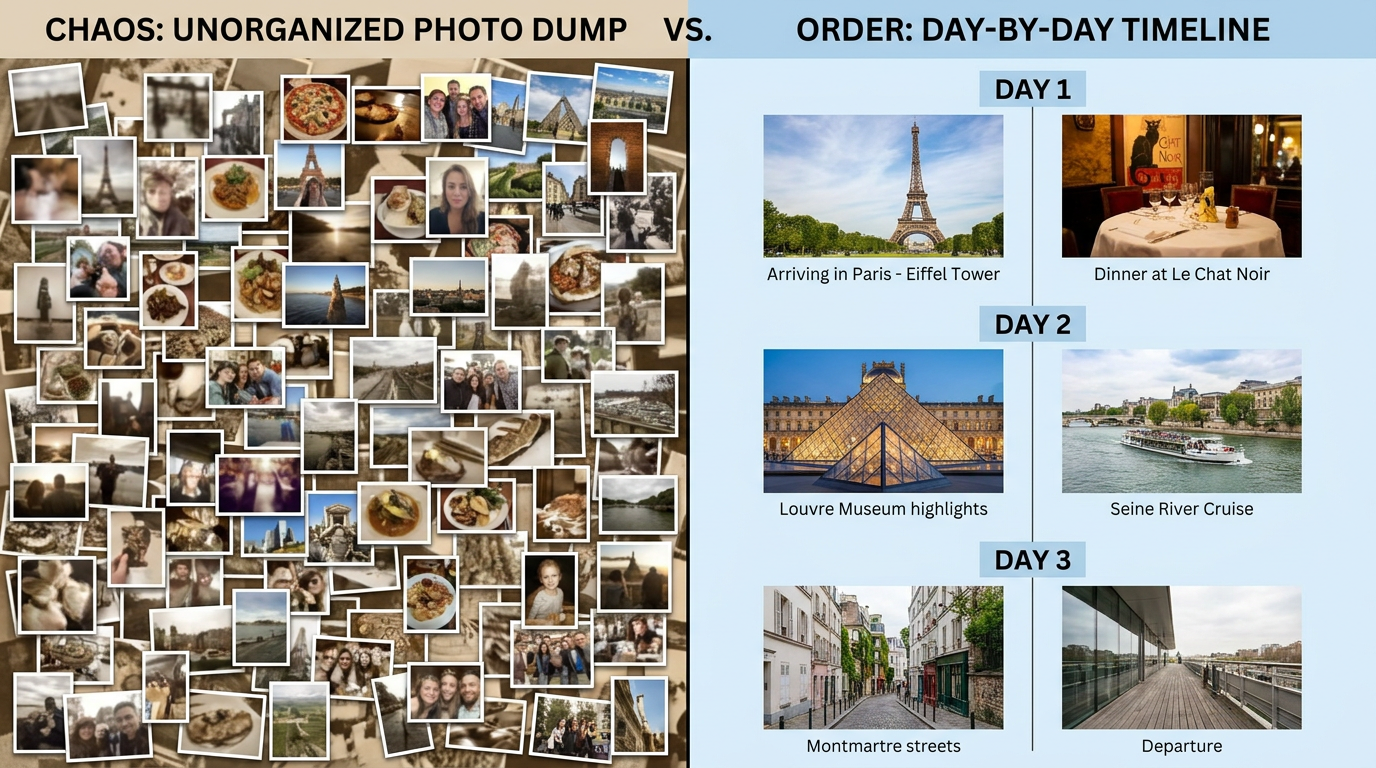
None of that is Apple’s fault or Google’s fault. Both built excellent tools for the job they set out to do, which is moving photographs between people efficiently. The job your friend group actually needs doing is a different one. So what would that tool need to look like?
What a Group Memory Actually Needs
Forget products for a minute. If you were designing the ideal home for four days spent with those specific people, what would it have to do? Six things, roughly.
1. Structure, not one endless scroll.
Organised by day, by place, or by moment — so there’s a shape you can move through rather than a pile you have to sift. Day one was the drive. Day two was the disaster with the boat. Day three nobody left the beach. That’s how you remember it, so that’s how it should be stored. A shape makes it navigable; a pile makes it homework.
2. Context attached to the pictures.
Who was there. Where it was. Why everyone was crying with laughter. One line under a photo — “twenty minutes after this we realised we’d left the keys inside” — does more work than the photo alone will ever do. A photo without its story is just an image. A photo with its story is the thing you actually wanted to keep.
3. Room for six versions of the same trip.
Six people came back from that trip with six different trips. Someone’s highlight was a conversation on a balcony that nobody else was part of. Someone spent the whole third day being quietly ill and finds that hilarious in hindsight. The best record holds all of those versions — not just the edit belonging to whoever happened to make the album. This is why produces something richer than a single-author account ever does. One person’s version is a summary. Six people’s versions are the trip.
collaborative storytelling that holds several perspectives on the same moment
4. One home, regardless of which phone anyone owns.
Nobody should be excluded by their operating system. Nobody should be the person who “can’t really use it.” If your group has a Pixel, three iPhones and a laptop, all five of you should be equal participants without anyone doing setup gymnastics. The technology should be invisible; the friction is what kills participation.
5. Clear, changeable control over who can see it.
Everyone should know who has access. Whoever set it up should be able to change that later without going on a support-forum expedition. Friendships change, and the ability to adjust access should be a two-tap thing, not a research project.
6. A reason to open it again.
Something that rewards a return visit six months on. A digital memory book works precisely when it isn’t finished on day four — when there’s still a note someone added in November that you haven’t read, or an anniversary that brings it back round. The measure of a good group record isn’t how it looks the week you make it. It’s whether anyone opens it a year later.
Read those six back and you’ll notice something: not one of them is really about photographs. They’re about narrative, participation and access. Which is a description of something other than an album — and friend groups have already started using it.

What Friend Groups Are Doing Instead: The Shared Journal
The simplest way to describe it, in the vocabulary you already use: an album with the story in it.That’s the whole idea. Same photos, same people, same trip — but the context travels with the images instead of dying in the group chat. Once you’ve seen the difference it’s hard to go back to a grid.
In practice it works like a : one journal for the trip, everyone in the group contributing their own entries. Organised by day or by place rather than by upload timestamp, so the boat disaster is filed with the boat disaster and not scattered across four hundred items in reverse-chronological order. Everyone adds their version. Nobody’s edit is the official one.
shared journal app for friends
It holds more than photographs. Text, photos, video, audio, links — all of it in the same entry. Which means the voice note somebody recorded on the bus at 2am sits next to the pictures from that night. The link to the restaurant you all still talk about is attached to the meal, not lost in a chat thread. The one-line caption explaining the car park photo is under the car park photo, where it does its job. You can browse if you want the specifics, but the principle is straightforward: whatever form the memory took, it goes in the same place.
what a journal entry can actually hold
Nobody gets left on the awkward path. It runs on , which solves the mixed-device problem outright. Your friend on the Pixel is a full contributor, not a spectator with a read-only browser link. Given that the person on the wrong platform is reliably the person who stops participating, removing that split does more for group contribution than any amount of nagging in the chat.
web, iOS, Android and HarmonyOS
On privacy — the specific frustration, answered
Section three surfaced a real and recurring problem: people don’t know who can see their group’s photos, don’t know who can delete what, and can’t easily change access after the fact. That confusion is documented on Apple’s and Google’s own public forums. So this isn’t a marketing point, it’s a direct response.
- Journals are private by default. Nothing is public unless you make it so.
- Access is owner-controlled and revocable — you decide who’s in, and you can change that later without hunting through settings.
- Data is encrypted in transit.
- Lugelo does not sell your data to third parties.
- Deletion is available if you want your content gone.
Plain terms, no asterisks. The point isn’t that this is exotic — it’s that you should know the answers to those questions about your own trip, and right now most groups don’t.
The blank page problem
Remember the two people who never added anything? The obstacle usually isn’t laziness — it’s the blank page. Being handed an empty box and told “write about the trip” is a genuinely intimidating thing, and most people quietly decide they’ll do it later.
Templates cut that down to filling in a shape rather than inventing one. And the AI Journal Assistant helps get a first sentence onto the page when someone’s staring at nothing, which is very often the only barrier between a non-contributor and a contributor. Lower the cost of starting and more of your group starts.
If you’d rather weigh your options than take our word for it, we keep an
honest comparison of journaling apps in 2026
Having the right home for the trip is genuinely half the battle. The other half is what your group actually does in the first week back.
that lays out what suits different kinds of journaler.
Keeping It Alive After the Trip
The best tool in the world dies if the group treats it like homework. Four tactics, all learned from watching this go wrong.
1. One person starts it — by name.
Not the group chat deciding by committee, which is how nothing has ever been decided. One named person, volunteering out loud, ideally before the trip is even over. “I’m setting it up on the flight back” beats “we should do an album” by an enormous margin.
2. Use the 48-hour window.
Momentum has a short half-life. Set it up while everyone is still actively posting in the chat and still slightly sunburnt — not two weeks later when the trip has emotionally closed. Photos added in the first two days arrive on a wave. Photos requested a fortnight later arrive never.
3. Send one prompt per person, not a general plea.
This is the big one. “Everyone add your photos!” is addressed to nobody and will be actioned by nobody. “Rach — add your favourite photo from Thursday and one line about why” is a specific, small, obviously-doable request aimed at one human being, and it gets answered. Six individual messages will out-perform six group pleas every single time. It directly fixes the uneven-contribution problem, because the problem was never willingness — it was vagueness.
4. Book the revisit.
Put a calendar reminder in for the trip’s anniversary. That’s it. A memory that people return to is almost always one that somebody scheduled a return to. These same mechanics — accepting that contributors are asymmetric, and building in reasons to come back — are , whatever the group.
what keeps a collaborative journal alive months later
And then, once the trip is actually written down rather than just photographed, it can become other things. A storybook. An eBook you can hand round. A timeline you can move through by day. Even a VR gallery you can walk into. Those are all downstream of one thing: somebody wrote down what happened while they still remembered it. If you’re heading somewhere new,
journaling your way through a trip
as it happens is considerably easier than reconstructing it afterwards.
Shared Albums: Frequently Asked Questions
How do I share a photo album on iPhone?
Enable Shared Albums in Settings → [your name] → iCloud → Photos. Then open Photos → Collections → Shared Albums → Add (+) → New Shared Album, name it, and add participants using their contact details or Apple Account email. Tap Create, then add your photos.
How do I share a Google Photos album?
Select your photos, tap Add to → Shared album → New shared album, and give it a title. Then tap Share and either invite specific Google Accounts or generate a link. Contributors need a Google Account; link recipients can view without one.
What’s the best way to share photos with a mixed iPhone and Android group?
Honestly, neither platform’s route is frictionless for a split group. Your best option is something platform-neutral that everyone can reach in a browser or a native app on their own device, so no one is stuck as a read-only spectator to their own trip.
Who owns the photos in a shared album?
In practice, whoever uploaded an item generally controls it, and whoever created the album controls the album itself. On Google Photos, only the owner can remove people — and removing someone also removes the content they added. This split is a common source of group confusion.
How many people can join a shared album?
Apple documents a maximum of 100 subscribers per shared album and 5,000 combined photos and videos from all contributors, with photos reduced to 2,048 pixels on the long edge. The full figures are on .
Apple’s Shared Album limits page
What’s the difference between a shared album and a shared journal?
An album holds the photos. A holds the photos and the story — organised by day or place, with everyone’s perspective included, plus text, audio, video and links alongside the images.
shared journal for friends
Can I stop someone from seeing a shared album later?
Yes, but the method matters. Per , removing a person does not revoke access while link sharing is still on — you must turn the link off, which invalidates it. On Lugelo, access is owner-controlled and can be changed later.
Google’s shared album controls

The Real Problem Was Never the Photos
Somewhere on your phone right now is an album nobody has opened since October. It isn’t empty. It’s got four hundred perfectly good photographs in it, contributed by six people who were having one of the better weeks of their year.
Here’s the reframe, and it’s the whole point of this article: you didn’t run out of photos. You ran out of story.
The fix is genuinely small. It starts with one person in the group. It usually always does.
Four days with those particular people — the specific ones, the ones who were there — is worth considerably more than a grid of compressed copies filed by upload time. It deserves somewhere it can all sit in one place: the pictures, the jokes, the voice note, the reason any of it was funny. Somewhere easy to revisit, and still there next year when someone brings it up at dinner.
Your Memories Deserve Better Than Scattered Apps
Start a shared journal for your group, invite the others, and put the trip somewhere you’ll actually open again.
Get Started with a shared journal for your group
Or download Lugelo for web, iOS, Android and HarmonyOS — so nobody in the group gets stuck on the awkward path this time.